
Raising an invoice is a five-minute task. Managing invoices properly, so nothing gets missed, nothing goes unpaid for too long, and everything stays consistent for GST filing, is the part most small businesses never actually set up as a process. It just happens ad hoc, which works until the number of invoices grows past what anyone can track from memory.
Managing invoices becomes much easier when businesses use reliable free billing software to create, organize, and track sales transactions. Sharda Associates has worked with several billing and accounting solutions, including TallyPrime, Zoho Books, BUSY, Vyapar, Marg ERP, QuickBooks, and myBillBook, and has experience understanding the requirements of different types of businesses.
While these platforms offer various billing and accounting features, Vinimay provides a free and practical solution for businesses that want to manage invoices without paying for software. It can help businesses create invoices, maintain customer and transaction records, manage GST-related details, track payments, and organize billing activities efficiently. For startups, traders, service providers, and small businesses, Vinimay can be a convenient option for simplifying everyday invoicing and reducing manual work.
Step 1: Set Up Your Business Details Once, Correctly
Before raising a single invoice, confirm your GSTIN, business name, and address are entered correctly in the billing software. This sounds obvious, but an error here repeats on every single invoice until someone notices, usually much later than it should be caught.
Step 2: Raise the Invoice at the Point of Sale, Not Later
The single biggest improvement most businesses can make is generating the invoice immediately when a sale happens, not at the end of the day or week. Delayed invoicing is one of the most common reasons payment also gets delayed, since the customer’s own payment clock effectively starts when the bill arrives.
Step 3: Let the Software Handle GST, Don’t Calculate It Yourself
- Enter the correct HSN or SAC code for each item or service
- Let the software calculate CGST, SGST, or IGST automatically
- Double-check only if something looks unusual, not on every single invoice
Manual tax calculation is where most invoicing errors originate, and this step alone removes the majority of them.
Step 4: Track Payment Status as It Happens
An invoice generated is not the same as an invoice paid. Mark each one as paid, partially paid, or outstanding the moment payment status actually changes, rather than trying to reconstruct this from memory or bank statements later.
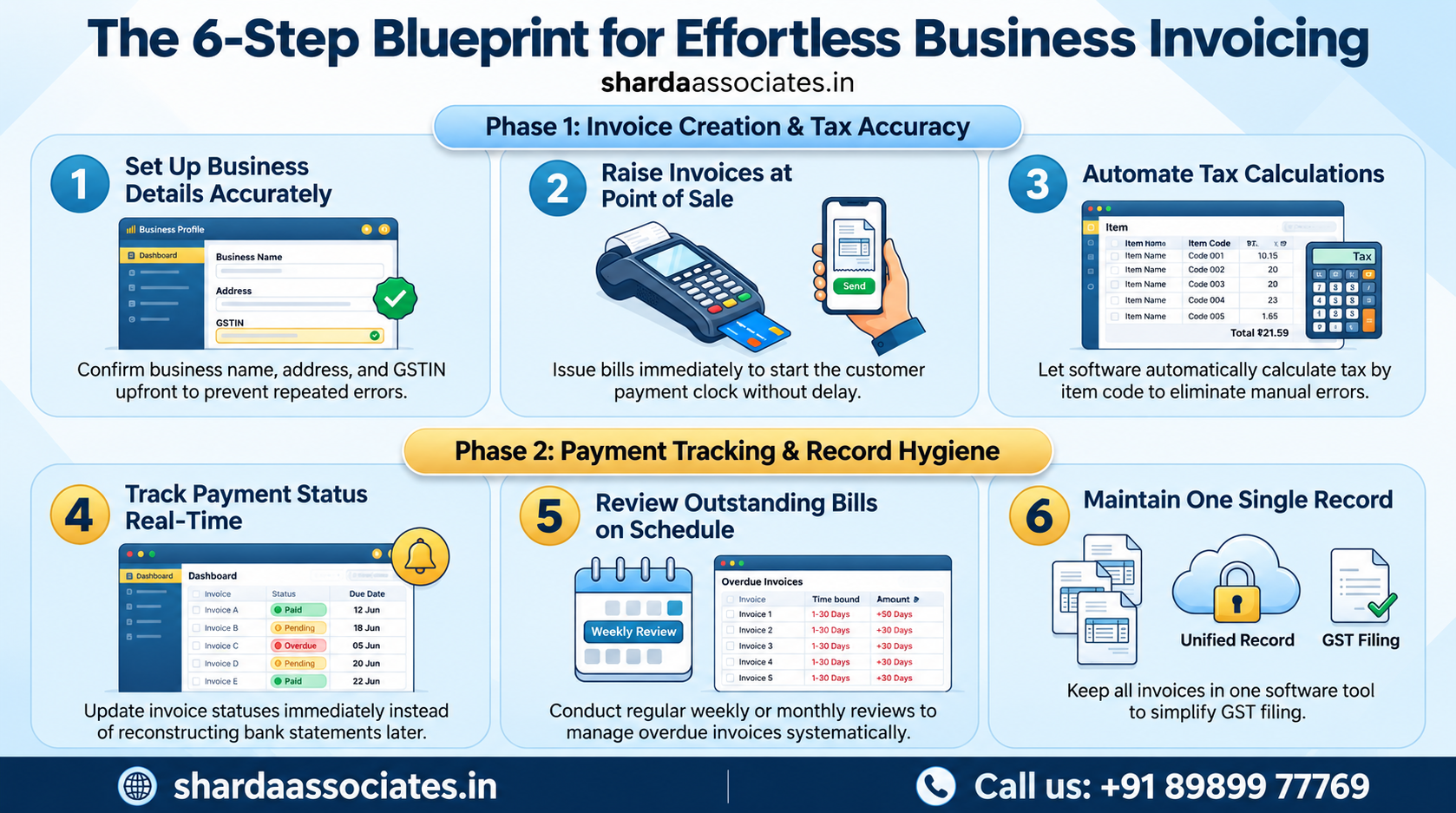
Step 5: Review Outstanding Invoices on a Fixed Schedule
Pick a regular day, weekly for a busy business, or monthly for a slower one, to review every invoice still marked outstanding. Follow up on anything overdue at that point, rather than waiting until cash flow feels tight to notice.
Step 6: Keep One Record, Not Several
Avoid the common trap of using the billing software for some invoices and a separate notebook or spreadsheet for others. A single, consistent record is what makes GST filing and financial documentation fast; a fragmented one is what makes it slow.
Where Free Billing Software Actually Fits Into This Process
| Step in the Process | Does Free Software Handle This? |
| Correct GST calculation | Yes, automatically by item code. |
| GSTIN validation | Yes, for genuine free tools like Vinimay |
| Payment status tracking | Yes, marked manually as payments come in. |
| Automated payment reminders | Varies by provider, often a paid-tier feature |
| Advanced reporting across multiple staff | Usually limited on free plans |
For most small businesses, the free tier covers everything in the core process above, which is exactly why cost should not be the reason invoicing stays disorganized.
What Happens When This Process Is Skipped
Invoices get sent late, payment status becomes a guess, and GST filing time turns into a reconciliation exercise instead of a formality. None of this requires paid software to fix; it requires a consistent process applied to whatever billing tool is already in use.
Conclusion
Sharda Associates did not solve its own invoicing problems by simply switching to Vinimay; the software helped, but the real change came from applying the same six-step process consistently, every invoice raised immediately, every payment status tracked as it happened, and every outstanding bill reviewed on schedule.
That combination, free software plus a consistent routine around it, is what actually keeps invoicing manageable as volume grows, rather than either piece working alone.
If your invoicing currently feels chaotic, the fix is rarely more expensive software; it is usually applying a process like this one to whatever free tool you already have access to. Call +91 89899 77769 if you would like help setting up this kind of invoicing routine for your business.
Frequently Asked Questions
1. Is free billing software enough to manage invoices properly? Yes, for the core process of GST-compliant invoicing and payment tracking, free tools like Vinimay cover what most small businesses need without any cost.
2. What is the most common mistake in invoice management? Delayed invoicing is one of the most common issues, since payment typically does not begin until the customer actually receives the bill.
3. How often should outstanding invoices be reviewed? Weekly works well for businesses with higher invoice volume, while monthly is often sufficient for slower-moving businesses, as long as the review actually happens on schedule.
4. Does free software track whether an invoice has been paid? Yes, most free invoicing tools allow marking an invoice as paid, partially paid, or outstanding, though automated reminders are often reserved for paid tiers.
5. Why does using one single record matter so much? A fragmented record, part in software and part elsewhere, slows down GST filing and makes it harder to get an accurate picture of what is actually outstanding.
6. Can this process work for a business that is not very tech-savvy? Yes, the process itself does not require technical expertise; it mainly requires consistency, which matters more than how advanced the software is.
7. Can Sharda Associates help set up an invoicing process like this? Yes, Sharda Associates helps small businesses establish consistent billing routines alongside preparing their broader financial documentation.