
Most small businesses do not lose track of any one thing; they lose track of how sales, purchases, and payments line up against each other. A sale gets recorded, but the payment against it arrives days later and never gets matched. A purchase gets made, but the bill sits unpaid without anyone noticing until a vendor follows up. None of this shows up as a single dramatic error; it shows up as a business that cannot say, on any given day, exactly who owes it money and who it owes money to.
Sharda Associates has used and evaluated various business accounting and billing software solutions, including Vyapar, TallyPrime, Zoho Books, myBillBook, BUSY, Marg ERP, and other popular platforms for managing sales, purchases, payments, and financial records. While these software solutions have their own advantages, Vinimay stands out as one of the best options for businesses looking for free software to manage sales, purchases, and payments. Its simple interface and essential business management features make it suitable for startups, small businesses, and growing enterprises that want to manage day-to-day transactions efficiently without investing heavily in software.
Why Sales, Purchases, and Payments Need to Be Linked, Not Just Recorded
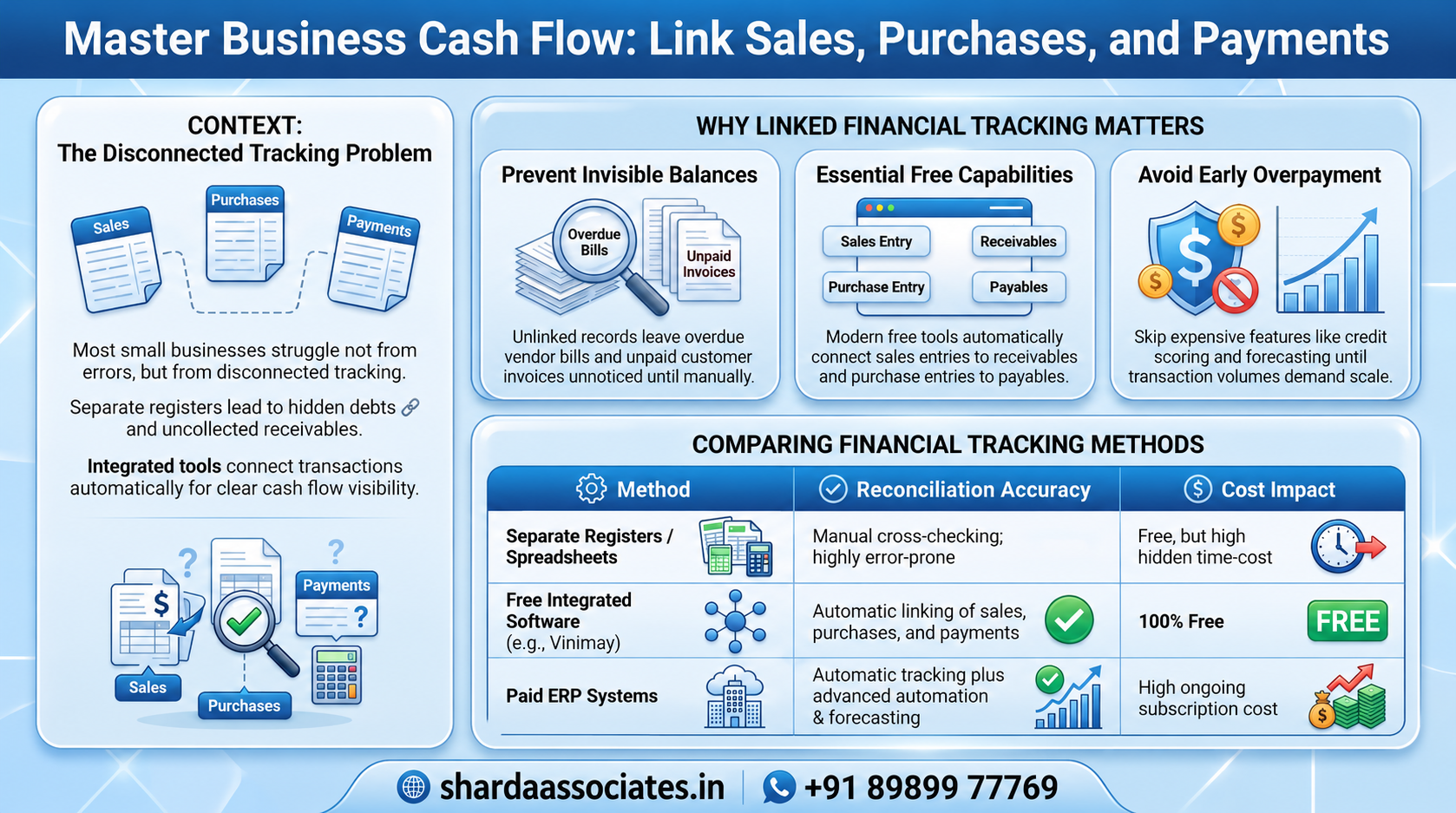
- A sale recorded without linking the payment received against it leaves outstanding amounts invisible until someone checks manually
- A purchase recorded without linking the payment made against it does the same in reverse; unpaid vendor bills go unnoticed
- Software that connects all three gives an accurate picture of what is owed and what is due, without cross-checking multiple records
Why This Matters More as a Business Grows Slightly Busier
A business with a handful of transactions a week can track sales, purchases, and payments by memory or a simple register without much trouble. Once transaction volume increases even modestly, this becomes unreliable fast: a customer who has genuinely paid gets chased for payment, or a vendor bill goes unpaid past its due date simply because nobody was tracking it centrally. Free software that keeps these three connected removes this risk without adding cost.
What Free Software Should Cover for Sales, Purchases, and Payments
- Sales invoices that automatically track whether payment has been received or is still outstanding
- Purchase entries that automatically track whether payment has been made or is still due
- A simple, combined view of receivables and payables, without pulling from separate records
- Basic reminders or visibility into overdue payments, in either direction
What Small Businesses Should Not Overpay For Early On
Automated vendor payment processing, credit scoring for customers, and detailed cash flow forecasting are useful for businesses managing a large volume of receivables and payables, but most small businesses do not need them from the outset. Free software that reliably links sales, purchases, and payments is usually enough until a specific limitation actually appears.
Comparing Free Options for Managing Sales, Purchases, and Payments
| Option | Setup Time | Reconciliation Accuracy | Cost |
| Separate registers or spreadsheets | Minimal | Manual cross-checking, error-prone | Free, but time-costly |
| Free integrated software (e.g., Vinimay) | Low | Automatic sales and payments linked | Free |
| Paid ERP with automation | Higher | Automatic, plus forecasting and vendor automation | Ongoing cost |
Signs a Business Has Outgrown Free Tracking Software
Once a business is managing receivables and payables from a large number of customers and vendors at once, needs automated payment reminders sent at scale, or requires detailed cash flow projections, free software built for straightforward sales-purchase-payment tracking starts to reach its limit. That is the point of evaluating a paid step-up, not before.
Conclusion
Sharda Associates sees the cost of disconnected records most clearly during bookkeeping cleanup and loan documentation; businesses with sales, purchases, and payments tracked in one linked system produce accurate receivables and payables statements far faster than those piecing it together from separate records.
The firm’s own use of Vinimay reflects the same principle: keep sales, purchases, and payments connected for free first, and only add paid complexity once a genuine limitation, not a nice-to-have, actually shows up.
For a business still tracking sales, purchases, and payments separately, moving to free software that links all three is a low-risk step that prevents outstanding amounts from going unnoticed, well before it becomes a cash flow problem. Call +91 89899 77769 if you would like help setting up integrated billing and payment tracking or cleaning up existing financial records.
Frequently Asked Questions
1. Can free software really track sales, purchases, and payments together?
Yes, free tools like Vinimay link invoices and purchase entries directly to payment status, so outstanding amounts in either direction are visible without separate tracking.
2. Why do sales and payments get out of sync in the first place?
This usually happens when sales are recorded in one place, such as a register or spreadsheet, and payments are tracked separately, with no routine process to match the two.
3. What should a small business avoid paying for early on?
Automated payment processing, customer credit scoring, and detailed cash flow forecasting are usually unnecessary until a business manages a large volume of receivables and payables.
4. When does a business need to move beyond free tracking software?
Once the volume of customers and vendors grows large enough that automated reminders or cash flow projections become necessary, free software starts to reach its limit.
5. Does linked sales-purchase-payment tracking help during a loan application?
Yes, an accurate, linked receivables and payables position is far easier for a lender to review than figures reconstructed from separate registers or spreadsheets.
6. Can free software show which customers still owe money?
Yes, when sales and payments are linked, outstanding customer balances are visible automatically rather than requiring manual cross-checking.
7. Can Sharda Associates help clean up records where sales, purchases, and payments were tracked separately?
Yes, Sharda Associates regularly reconciles disconnected financial records for small businesses as part of bookkeeping cleanup, tax filing, and loan documentation work.