
Have you recorded TDS receivable in your books, but the amount does not match Form 26AS or your Annual Information Statement (AIS)? Or does your customer’s TDS certificate show a different amount from the TDS recorded in your accounting software?
A TDS mismatch can create problems during income tax return filing, tax-credit reconciliation, and finalization of accounts. If the difference is not investigated properly, you may claim less TDS credit than you are entitled to—or claim credit that is not reflected in the tax department’s records.
The first step is to identify whether the difference is caused by an accounting entry, timing, incorrect PAN details, a deductor’s reporting error, or a tax-credit reporting issue.
Quick Answer
If the TDS amount in your books does not match Form 26AS, AIS or the TDS certificate, reconcile the figures transaction-wise and deductor-wise.
Check the following:
- Whether the TDS has actually been deducted from the payment or credited income.
- Whether the TDS receivable entry is recorded correctly in your books.
- Whether the deductor has quoted your correct PAN.
- Whether the deductor has filed the relevant TDS statement.
- Whether the TDS has been reported under the correct financial year, assessment year or tax year.
- Whether the deductor has issued the correct TDS certificate.
If the deductor has reported incorrect information, ask them to file a correction statement. Do not claim a tax credit merely because an amount appears in your accounting ledger.
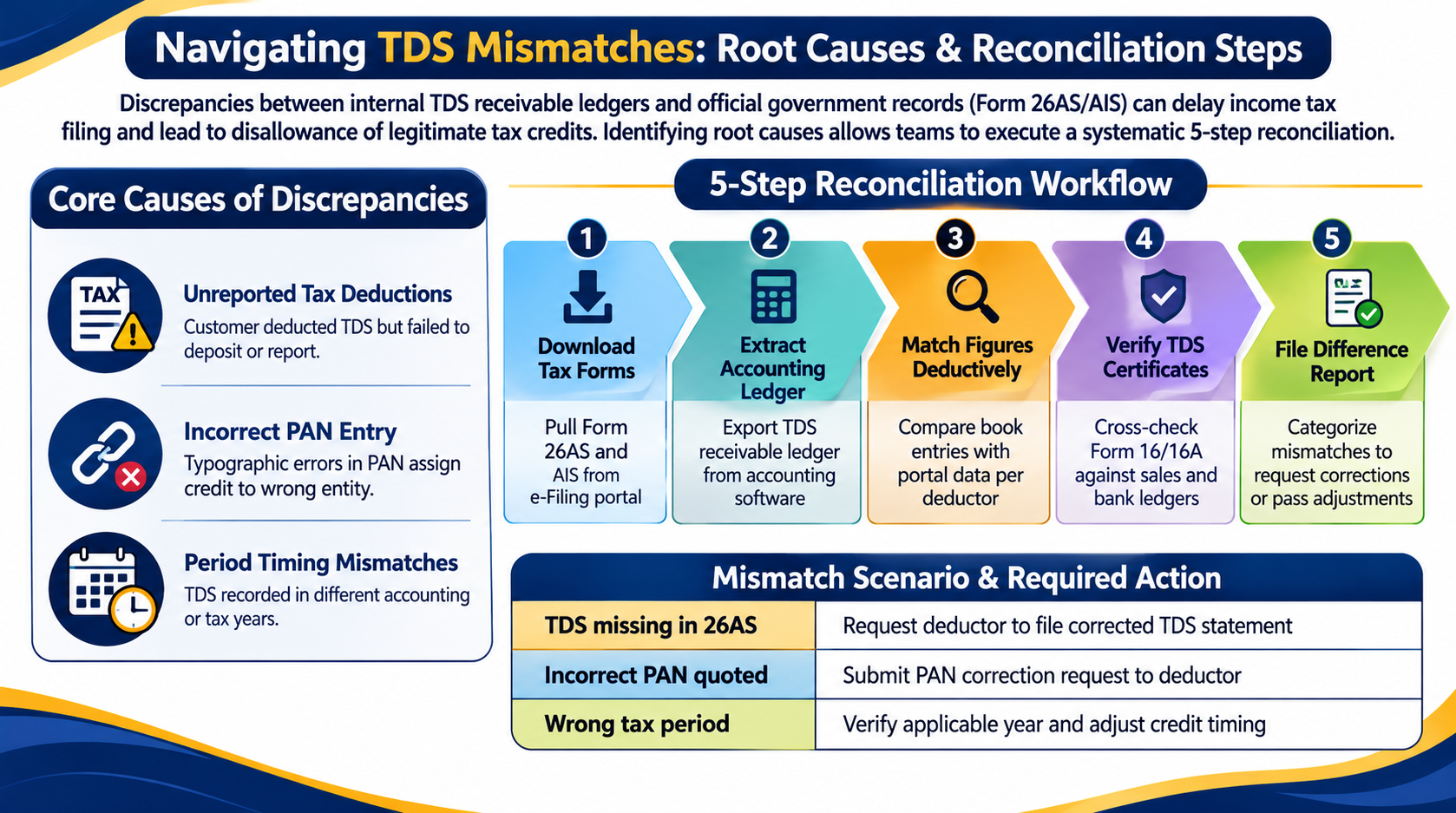
Why Does the TDS Amount Differ Between Books and Form 26AS?
There can be several reasons for a TDS mismatch. Identifying the actual reason is important before passing any adjustment entry or filing your income tax return.
A. TDS Is Recorded in Books but Not Deposited or Reported
A customer may deduct TDS from your payment but fail to deposit it or report it correctly in the TDS statement.
For example:
- Invoice value: ₹1,00,000
- TDS deducted by customer: ₹10,000
- Amount received: ₹90,000
Your books may show ₹10,000 as TDS receivable. However, the amount may not appear in Form 26AS if the deductor has not correctly deposited or reported the deduction.
In this situation, contact the deductor and request the relevant TDS details and correction, where required.
B. Incorrect PAN Quoted by the Deductor
If the deductor enters an incorrect PAN while filing the TDS statement, the tax credit may not appear against your PAN.
This can happen due to:
- Typing errors in PAN.
- Incorrect customer or vendor master details.
- Using another entity’s PAN.
- Incorrect employee PAN details in salary TDS reporting.
Ask the deductor to verify your PAN and submit the necessary correction statement.
C. TDS Recorded in the Wrong Financial Year
TDS may be recorded in your books in one accounting period but reported by the deductor in another period.
This can happen when the timing of income recognition, payment, deduction, and reporting differs.
For example, a professional fee may be recorded as income in March, while the customer deducts and deposits TDS in accordance with the applicable provisions at a later date.
Do not automatically treat this as missing TDS. Check the applicable tax-credit year and the supporting records before making an adjustment.
D. TDS Rate or Amount Is Incorrect
The deductor may deduct tax at an incorrect rate or calculate TDS on a different amount.
Common reasons include:
- Applying an incorrect TDS provision.
- Using an incorrect rate.
- Excluding or including amounts incorrectly.
- Applying an incorrect PAN status or rate.
- Making a deduction adjustment in a later payment.
Compare the invoice, payment advice, ledger account and TDS certificate to identify the difference.
E. TDS Is Reported Under the Wrong Assessment Year or Tax Year
Incorrect reporting of the tax period can also create a mismatch.
This is particularly important during the transition to the Income-tax Act, 2025. For amounts paid or credited up to 31 March 2026, the old Act framework applies. Amounts paid or credited from 1 April 2026 are generally governed by the new Act.
For the transition period, the tax department has also clarified that separate tax information statements are maintained for AY 2026–27 and Tax Year 2026–27.
Check the relevant period carefully instead of comparing amounts from two different tax years.
How to Reconcile TDS Amounts With Your Books
A proper reconciliation should be completed before finalizing accounts or filing the income tax return.
Follow these steps:
Step 1: Download Form 26AS and AIS
Log in to the Income Tax e-Filing portal and download the relevant tax information for the applicable period.
Review the TDS details, including:
- Deductor name and TAN.
- Amount paid or credited.
- TDS amount.
- Tax deduction and reporting period.
- Tax credit details.
Remember that Form 26AS and AIS serve different purposes. Review the relevant TDS information in both statements where necessary.
Step 2: Extract the TDS Receivable Ledger
Open your accounting software and extract the TDS receivable ledger for the same period.
Check:
- Customer-wise TDS entries.
- Invoice-wise deductions.
- TDS receivable balances.
- Journal entries and adjustments.
- Opening balances and previous-period entries.
Ensure that the ledger contains only genuine TDS receivable entries and that no duplicate or incorrect entries have been recorded.
Step 3: Match the Figures Deductively
Compare the TDS recorded in your books with the amount reported by each deductor.
A simple reconciliation statement can look like this:
| Particulars | Amount |
| TDS as per books | ₹50,000 |
| TDS as per Form 26AS | ₹42,000 |
| Difference | ₹8,000 |
The ₹8,000 difference should be investigated. It should not automatically be written off or claimed as additional tax credit.
Step 4: Verify TDS Certificates
Ask the deductor for the relevant TDS certificate, such as Form 16 or Form 16A, depending on the nature of the deduction.
Compare the certificate with:
- Your sales or income ledger.
- Bank statements.
- Customer ledger.
- Invoice and payment details.
- Form 26AS and AIS.
If the certificate and Form 26AS also differ, request clarification from the deductor.
Step 5: Prepare a Difference Report
Classify each mismatch into a suitable category:
| Type of mismatch | Action required |
| TDS in books but missing in 26AS | Contact the deductor and verify reporting |
| Incorrect PAN | Request PAN correction. |
| Wrong TDS amount | Verify deduction and request correction |
| Wrong tax period | Check the applicable year and reporting |
| Duplicate TDS entry in books | Verify and correct accounting records |
| TDS in 26AS but missing in books | Verify the income and record the appropriate entry |
This report helps you track unresolved differences before filing your return.
What If TDS Appears in Books but Not in Form 26AS?
If TDS is recorded in your books but does not appear in Form 26AS, first establish whether the tax was actually deducted.
Check the following documents:
- Customer ledger and payment advice.
- Bank statement showing the net payment.
- Invoice and corresponding income entry.
- TDS certificate, if available.
- Confirmation from the deductor.
If the deductor confirms that TDS was deducted but has not reported it correctly, request them to file or correct the relevant TDS statement.
The Income Tax Department’s guidance states that a TDS mismatch should be taken up with the employer or deductor, who may need to file a revised TDS statement.
Important: Do not assume that an accounting entry alone establishes eligibility for tax credit. Verify the applicable provisions and supporting evidence before claiming credit.
What If Form 26AS Shows More TDS Than Your Books?
Sometimes Form 26AS reflects a higher TDS amount than your accounting records.
Possible reasons include:
- TDS was deducted but not recorded in your books.
- The income was recorded in another ledger.
- The accounting entry was passed in a different period.
- The TDS amount was incorrectly recorded.
- The same deduction was entered twice in the books.
Identify the corresponding income and transaction before passing an accounting entry.
If the TDS is genuine and relates to income assessable in the relevant period, update the books with proper supporting documentation. Do not record unexplained tax credits merely to make the ledger match Form 26AS.
Can You Claim TDS Credit If It Does Not Match Your Books?
TDS credit should be claimed based on the applicable income-tax provisions and the actual tax deduction and reporting details.
A difference between the books and Form 26AS does not automatically mean that the TDS is invalid. However, you should not claim an unsupported amount simply to match your ledger.
Before filing your return:
- Verify the income against which TDS was deducted.
- Check the deductor’s PAN/TAN and reported amount.
- Confirm the relevant assessment year or tax year.
- Obtain the TDS certificate or written confirmation.
- Resolve reporting errors with the deductor wherever possible.
The tax department’s tax-credit mismatch facility compares the tax credits claimed in the return with the available records. A mismatch may result in the credit not being allowed as claimed.
How to Correct a TDS Mismatch After Filing Your ITR
The correction process depends on where the error occurred.
Case 1: The Deductor Filed Incorrect TDS Details
If the deductor has reported an incorrect PAN, amount or other deductee information, request them to submit a correction statement through the applicable TDS reporting system.
After processing, verify whether the corrected information appears in your tax records.
Case 2: You Entered Incorrect TDS Details in Your ITR
If the TDS information was available correctly but you entered the wrong TAN, amount or other details in your return, the correction route depends on the return’s filing and processing status.
For an eligible unprocessed return, a revised return may be available. If the return has already been processed, check whether a tax-credit mismatch rectification request is appropriate.
The Income Tax Department provides a Tax Credit Mismatch service under Services on the e-Filing portal.
Case 3: CPC Has Not Considered an Available Tax Credit
If you correctly reported the eligible credit and the relevant details are available in the tax records, review the intimation and consider an appropriate rectification request, if permitted.
Do not use rectification to introduce unsupported or additional tax credits.
How Sharda Associates Helps With TDS Reconciliation
TDS differences can affect tax-credit claims, financial statements and income tax return filing. A structured reconciliation helps identify errors before they create further compliance issues.
Sharda Associates assists businesses and professionals with:
- TDS receivable ledger reconciliation.
- Form 26AS and AIS verification.
- Deductor-wise and transaction-wise TDS matching.
- Identification of incorrect PAN, TAN, and tax-period reporting.
- Review of TDS certificates and supporting documents.
- Assistance in coordinating corrections with deductors.
- Income tax return and tax-credit mismatch review.
The objective is to ensure that the TDS recorded in the books is properly supported and that eligible tax credits are accurately reported.
Conclusion
A TDS amount mismatch between your books and Form 26AS should never be ignored. The difference may be caused by an accounting mistake, incorrect deductor reporting, a PAN error or a timing issue.
Reconcile your TDS ledger with Form 26AS, AIS, bank statements, and TDS certificates. If the deductor has reported incorrect information, request the necessary correction before finalising your tax-credit claim.
For professional assistance with TDS reconciliation, tax-credit verification, and income tax compliance, contact Sharda Associate.
Frequently Asked Questions
1. Why is TDS in my books different from Form 26AS?
The difference may arise due to incorrect PAN reporting, delayed or incorrect TDS statements, accounting errors, timing differences or reporting under the wrong tax period. Reconcile the figures deductor-wise to identify the actual reason.
2. Can I claim TDS if it is recorded in my books but not in Form 26AS?
Do not claim TDS merely because it appears in your books. Verify the actual deduction, supporting documents and applicable tax-credit provisions. Contact the deductor to correct missing or incorrect reporting.
3. What should I do if my customer deducted TDS but it is not showing in Form 26AS?
Ask the customer to verify the TDS deposit, your PAN and the details reported in the TDS statement. If there is an error, the customer may need to file a correction statement.
4. What is the difference between Form 26AS and AIS?
Form 26AS is the tax credit statement containing details such as TDS, TCS and taxes paid. AIS provides broader financial information reported to the Income Tax Department, including TDS-related information.
5. Can I correct a TDS mismatch after filing my income tax return?
Yes, depending on the nature of the error and the return’s processing status. You may need to request a correction from the deductor, file a revised return where permitted or submit an eligible rectification request.
6. What happens if the deductor reports TDS against the wrong PAN?
The credit may not appear correctly in your tax records. Ask the deductor to correct the PAN details through the applicable TDS correction process and verify the updated tax statement.
7. Should I pass a journal entry to match TDS in Form 26AS?
Not automatically. First identify whether the difference is due to a missing accounting entry, duplicate posting, incorrect deduction or reporting error. Pass an adjustment only when supported by the underlying transaction and documents.
8. How often should businesses reconcile TDS?
Businesses should reconcile TDS regularly, preferably during monthly or quarterly accounting reviews and before filing income tax returns. Regular reconciliation helps identify errors early and reduces last-minute tax-credit issues.