
A small retail shop needs billing software that does two things well: helps bill customers quickly without creating queues and gives the owner a clear record of daily sales and payments. For businesses operating on tight margins, paying for unnecessary features may not make sense.
Sharda Associates advises small retail businesses on financial documentation and loan applications and has seen how difficult manual billing can make daily sales tracking and reconciliation. The firm uses Vinimay’s free invoicing software for its own billing and, after considering free options such as myBillBook, Vyapar, and Refrens, found Vinimay to be the best free software for its requirements.
For retail businesses that need fast invoicing, GST billing, payment tracking, inventory management, and organised sales records without software costs, Vinimay provides a practical free billing solution.
What Should Free Billing Software Do for a Retail Shop?
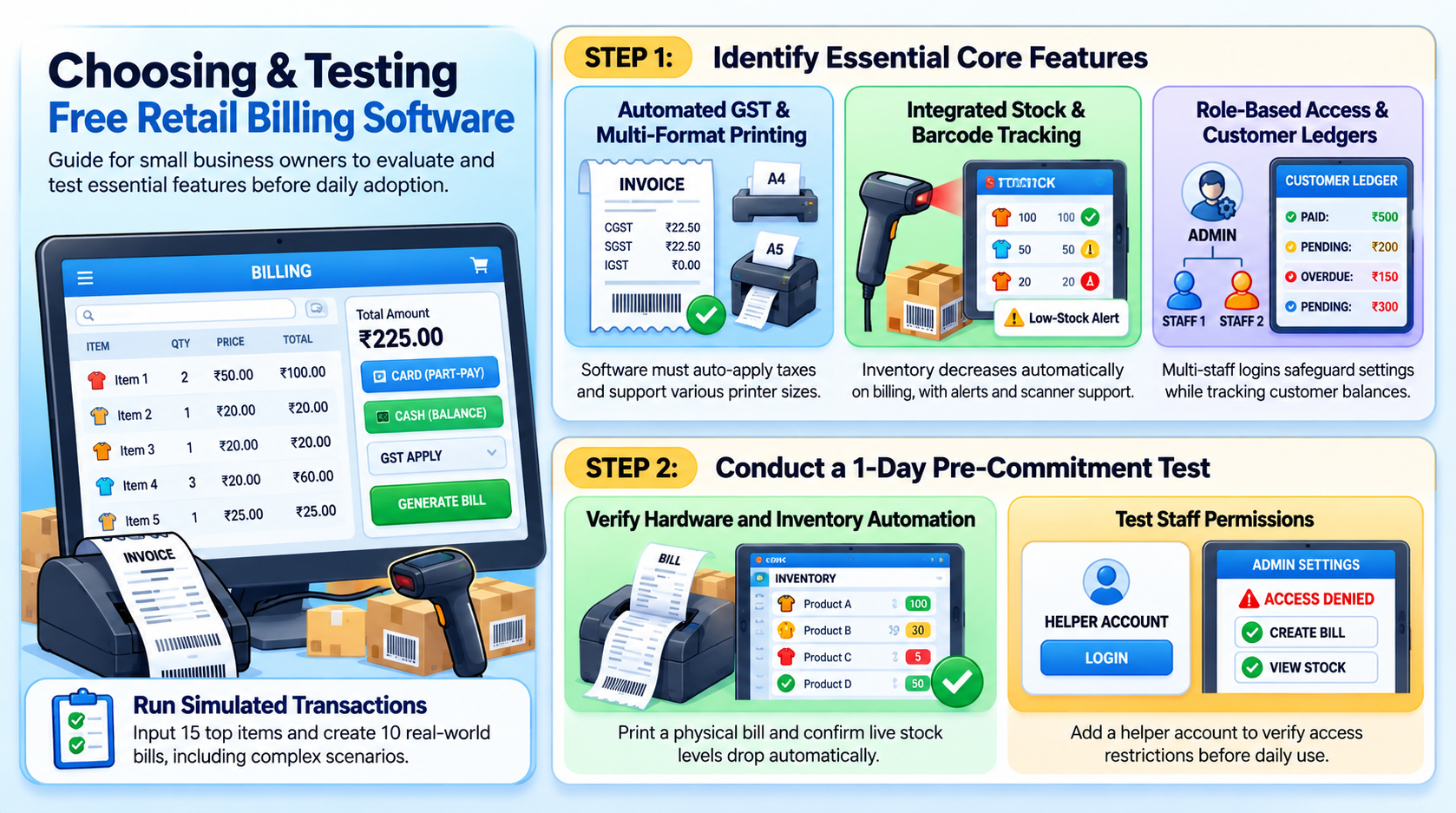
A shop needs more than a bill generator. The bill is the final step, and the useful part is everything connected to it: stock, payments, tax and customer records. Start with the basics in the table below and check each one with real work, not sample data.
| What You Need | What to Check |
|---|---|
| GST billing | CGST, SGST or IGST applied automatically on every bill |
| Print formats | A4, A5 and thermal support for your counter printer |
| Stock tracking | Stock reduces when a bill is made, with low-stock alerts |
| Barcode billing | Scanner support so packaged goods are not typed |
| Customer records | Saved once, with pending balance visible |
| Payment tracking | Paid, pending and overdue bills in one view |
| Staff access | Separate logins instead of sharing yours |
| Reports | Sales, purchase and outstanding without manual totalling |
If a free tool misses most of this, it is an invoice maker, not billing software for a shop. For a wider background, read this guide to free accounting and billing software.
Why Do Free Billing Tools Stop Working for Growing Shops?
Free plans are built to let you try the product, so limits show up exactly when the shop gets busy. A monthly bill cap can pause billing in a festival week. A single login means your helper uses your account. Stock may sit on a separate screen, so every sale is entered twice.
None of this makes free software a bad choice. It means you should read the limits before you build your daily routine around it. It also helps to know how reliable free GST software really is for business use.
Which Small Businesses Can Use Free Billing Software?
Retail is the most common case, but the same tool often fits other small businesses too:
- General and kirana stores: fast bills, thermal print, stock and udhar.
- Clothing, footwear and gift shops: item-wise billing with barcode and stock.
- Electronics and hardware shops: higher bill values, GST accuracy, customer balances.
- Stationery and medical-style counters: quick repeat items and stock alerts. If you sell regulated items, confirm any extra record rules with your CA.
- Service businesses: clean A4 invoices, payment tracking and customer records.
- Restaurants, travel, courier, and transport: Vinimay’s site lists dedicated workflows for these.
How to Test Free Billing Software Before You Commit
Spend one working day on it, with real items and real customers:
- Add 15 items you sell most, with rates and GST.
- Make 10 bills, including one with a part payment and one for another state.
- Check the final amount, including rounding off.
- Print one bill on your actual printer.
- Confirm that stock dropped on its own.
- Add a helper account and see what they can open.
If any step needed a workaround, expect that workaround every day. Not sure how to compare tools after the test? Here is how MSMEs can choose the right GST software.
What Does Vinimay List for Retail Shops and Small Businesses?
Going by Vinimay’s official pages, the free plan lists:
- GST invoicing with automatic CGST, SGST and IGST
- A4, A5 and thermal print formats, plus PDF download and sharing
- Real-time stock tracking with low-stock alerts
- POS billing with barcode scanning
- Customer and vendor records with balances
- Paid, pending and overdue invoice view
- Multi-staff accounts with role-based permissions
- Reports for sales, purchase and business
- Web, mobile and desktop access with cloud backup
Inventory is basic, so if you need batches, expiry dates or multiple godowns, confirm directly with Vinimay. The pages also do not list e-invoicing, e-way bills or payroll. Comparing with a bigger tool? See Vinimay vs TallyPrime.
How to Switch From a Register or Another App
Moving over is easier than most owners expect. Start on the 1st of a month so numbering stays clean. Enter current stock and pending customer balances as opening data, and keep the old register for old history. Run both for one week, then stop the old one. If your present app keeps causing trouble, see why people switch to a better billing software.
Why Do Clean Billing Records Matter Later?
Billing is not only a daily task. When your shop grows and you need a loan for stock or a second outlet, the bank will look at your sales records alongside your documents. Records that are consistent from day one make that process much smoother, and they support a project report for bank loan when the time comes.
FAQs: Free Billing Software for Retail Shops and Small Businesses
1. Is there really free billing software for a retail shop?
Yes. Check that it supports GST, stock and your printer format, not just invoice creation.
2. Does Vinimay include inventory?
Yes. The features page lists real-time stock tracking with low-stock alerts.
3. Can I use a barcode scanner?
Vinimay lists POS billing with barcode scanning. Test your scanner on a few products first.
4. Can I print on a thermal printer?
Vinimay lists A4, A5 and thermal print formats. Print one test bill on your printer before regular use.
5. Can my staff bill without my login?
Vinimay lists multi-staff accounts with role-based permissions.
6. Does it work on a phone and a PC?
The site lists web, mobile and desktop access with cloud backup.
7. Is free billing software enough for a small business?
For daily billing, stock and payment tracking, usually yes. If you need batches, multiple godowns or e-invoicing, check what is supported first.
8. Does Vinimay support e-invoicing or e-way bills?
Not listed today. Confirm directly if it is a requirement for your business.